


We are collecting a full set of cheat codes for ChatGPT — not “geek jokes”, but real control commands that turn AI from a chatty assistant into a working tool. If used correctly, the quality of responses changes radically.
The idea is simple. You write these commands at the beginning of a prompt or on a separate line before the main text. They set the mode of thinking, style, depth, and format of the response. Essentially, you program the output without code.
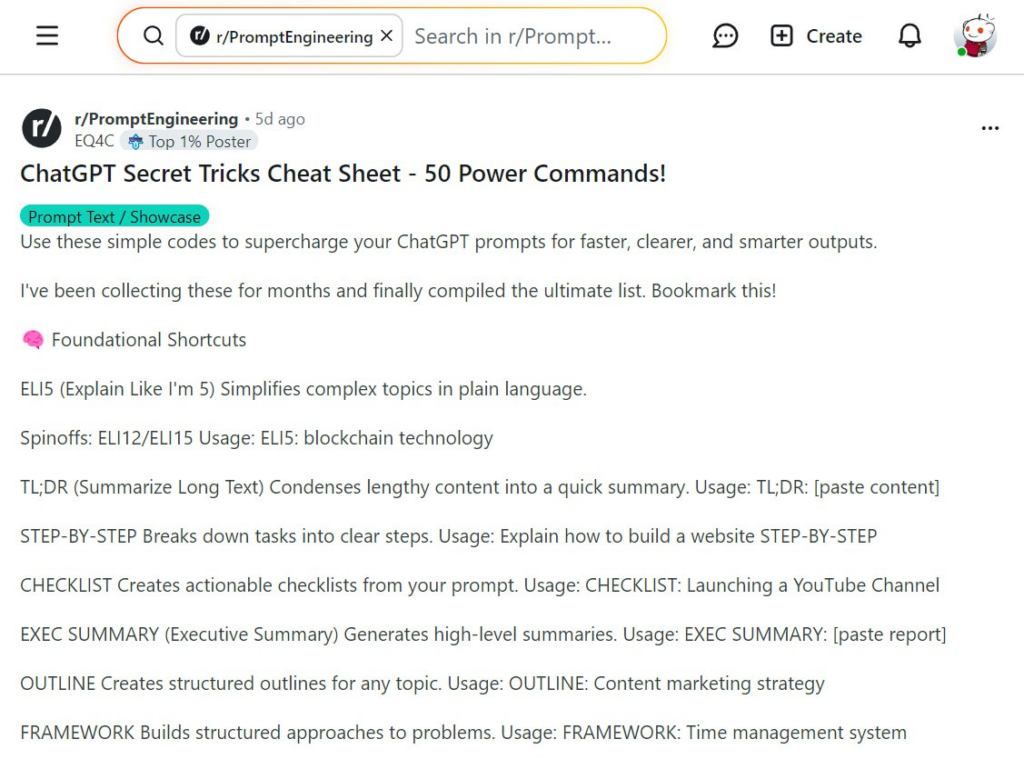
Basic commands. The foundation for any prompt.
ELI5
Explain Like I’m 5. AI explains a topic as simply as possible, without terms, complex constructions, or abstractions. Suitable when a topic is new, complicated, or you want to understand the essence, not the details.
ELI12 / ELI15
Same principle, but a higher level of explanation. Can be used for teenagers, students, or “normal adults without professional education.” Works well for finance, tech, and law.
TL;DR
Compresses long text into a short summary. Removes all secondary details, leaving only key takeaways. Perfect for reports, articles, letters, and longreads.
STEP-BY-STEP
Breaks a task into sequential steps. Useful for instructions, processes, learning, and implementing ideas. Minimizes chaos and “what to do next” questions.
CHECKLIST
Turns an abstract idea or complex process into a checklist. Convenient for control, repeatable tasks, project launches.
EXEC SUMMARY
Creates a short summary for a manager or investor. No details, but with conclusions, logic, and focus on the important. Ideal for business context.
OUTLINE
Creates a structure for text, presentation, article, course, or report. A skeleton on which content can be added later.
FRAMEWORK
Suggests a thinking model or system through which a task is best solved. Often tables, stages, levels, or logical blocks.
Style and delivery. When how matters as much as what.
JARGON
Translates the response into professional, industry-specific language. Minimal emotion, maximum terms and business tone. Useful for experts, documents, and reports.
HUMANIZE
Removes “machine-ness.” The text becomes lively, readable, with natural logic. Suitable for blogs, social media, letters to people.
SIMPLIFY
Simplifies complex text while keeping the meaning. Not “for idiots” but “without unnecessary complexity.” Great for client explanations.
AMPLIFY
Amplifies delivery. More dynamics, energy, emphasis, and engagement. Good for media, presentations, sales texts.
TONE:
Allows setting a specific tone. Examples: TONE: calm, TONE: aggressive, TONE: formal, TONE: ironic. Full control over text mood.
AUDIENCE:
Adapts the response to the target audience. Examples: AUDIENCE: beginners, AUDIENCE: investors, AUDIENCE: developers. Language, examples, and depth change.
Role and mindset change. The most powerful level.
ACT AS
AI responds as a specific specialist. Example: ACT AS fintech lawyer or ACT AS VC investor. Logic, focus, and priorities change.
ROLE / TASK / FORMAT
Strictly sets the context. Example: ROLE: analyst, TASK: evaluate risk, FORMAT: table. Removes fluff and chaos.
EXPERT MODE
Maximum depth, detail, and professional level. Less simplification, more nuances and assumptions.
EXPERT MODE
Maximum depth, detail, and professional level. Less simplification, more nuances and assumptions.
MULTI-PERSPECTIVE
Considers a topic from multiple perspectives: business, user, regulator, investor. Useful for complex decisions.
Logic and thinking enhancement.
FIRST PRINCIPLES
Analyzes the problem from scratch, without templates. What is it? What is it made of? Why does it work this way? Foundation for non-standard solutions.
FEYNMAN TECHNIQUE
Explains so anyone can understand. If you can’t explain simply, you don’t understand the topic.
DEVIL’S ADVOCATE
AI intentionally critiques the idea. Finds weaknesses, risks, and logical gaps. Very useful before making decisions.
DIALECTIC
Mini-debate format: thesis — antithesis — synthesis. Helps see conflicts and compromises.
PRE-MORTEM
Models failure in advance. What could go wrong and why. The best way to reduce risks.
ROOT CAUSE
Finds the root cause of a problem rather than treating symptoms. Especially useful in business and management.
IMPACT ANALYSIS
Analyzes consequences of decisions — financial, social, technical, reputational.
STRESS TEST
Tests an idea in harsh scenarios: crisis, market drop, regulator pressure, resource shortage.
Analysis and systematization.
SWOT
Classic analysis of strengths, weaknesses, opportunities, and threats. A working classic.
COMPARE
Visually compares options, approaches, or tools. Helps choose, not just read.
RISK MATRIX
Assesses risks by probability and impact. Useful for management and investing.
SCENARIO PLANNING
Examines the future through scenarios: optimistic, base, pessimistic.
Control of response format.
FORMAT AS
Sets the format: table, list, diagram, presentation, letter.
REWRITE AS
Rewrites the text in a different style, tone, or for a different audience.
TEMPLATE
Creates a universal template that can be reused repeatedly.
HIERARCHY
Arranges elements by importance and priority.
Quality and boundaries control.
FACT-CHECK
Verifies facts and flags questionable points.
PEER REVIEW
Simulates expert review. Shows strengths and weaknesses of the response.
EVAL-SELF
AI evaluates its own result, indicating where it can improve.
GUARDRAIL
Strictly limits response boundaries: volume, topics, style, assumptions.
Final lifehack.
Commands can be combined. Example: ACT AS + EXPERT MODE + STEP-BY-STEP + FORMAT AS table.
And this is no longer just chat. This is a tool. Save it and use it while others are “just asking.”
All content provided on this website (https://wildinwest.com/) -including attachments, links, or referenced materials — is for informative and entertainment purposes only and should not be considered as financial advice. Third-party materials remain the property of their respective owners.